Golden-Hour Backlit Portraits: Clear Faces, Detailed Skies

For a golden-hour backlit portrait, solve position before exposure: hide the sun behind the subject or foliage, turn the face toward open sky or a pale wall, and then raise the face exposure only until important highlights still retain detail. The goal is not to make the histogram look centered. It is to keep the expression readable while preserving useful color and texture in the sky, skin, and clothing.

01. Place the sun before you touch exposure compensation
Direct sun inside the frame can create a contrast range that is difficult to manage and can wash flare across the face. Ask the subject to move left or right in small steps until the sun is covered by the head, shoulder, a tree trunk, or leaves. Then change your own camera height by a few inches to refine how much light peeks around the edge.
This is faster than chasing settings while the flare changes in every frame. Once the sun position is stable, make one reference frame and check the face, bright clouds, light clothing, and any reflective water. Those four areas tell you whether the scene is ready for a consistent sequence.

02. Use open sky and pale surfaces as practical fill light
A white stucco wall, pale sidewalk, sand, or bright building can return broad light to the shadow side of the face. Turn the subject 15 to 30 degrees toward that surface and compare the two eye sockets, the cheeks, and the area under the chin. A broad surface usually looks more natural than a tiny, hard source.
Do not assume that brighter is automatically better. Move close enough for the face to become readable, then step away if the skin looks flat or the wall color contaminates it. Position is the first control; exposure is the second.


03. Expose for the face without sacrificing every useful highlight
In an automatic exposure mode, add compensation in small steps when the face is too dark. In manual exposure, decide on the shutter speed needed for movement and the aperture needed for depth of field, then adjust ISO last. The exact numbers vary with the scene, so use a repeatable decision order instead of memorizing one setting.
A histogram maps dark tones on the left and bright tones on the right. A spike at the right edge can indicate clipping, but the sun itself may clip because it is far brighter than the scene. Protect the areas you need to reproduce: skin highlights, white clothing, and textured clouds. Do not underexpose the entire portrait just to preserve the center of the sun.

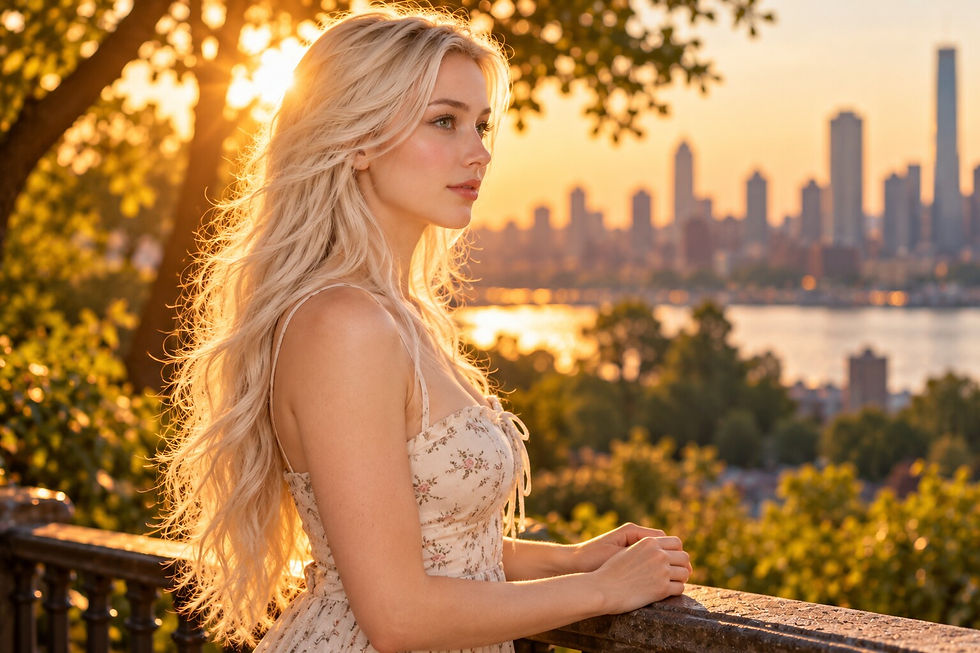
04. Control flare with camera angle and shade
If the whole frame turns milky, shade the front of the lens with your hand or a hat while keeping it outside the frame. Then move the camera slightly so the sun sits farther behind the subject or just beyond the frame edge. Clean the front surface and remove unnecessary filters when you are diagnosing the problem.
Some flare can support the mood, but it should not erase the eyes or make dark clothing featureless. Treat the face as the acceptance test. If the expression is difficult to read, change position before trying to restore contrast in editing.


05. Build a sequence instead of cropping the same pose
Use the wide frame to explain the environment, a full-body frame for motion and posture, a three-quarter frame for hands and torso, a close portrait for eyes and skin, and a profile for the rim light. Change the action with the crop. Walking, sitting, leaning, turning, and looking back create different photographs instead of five versions of one pose.
Give one direction at a time. First set the feet, then the shoulders, then the chin, and finally the eyes. If you change all four at once, the pose often becomes stiff and it is harder to tell which adjustment improved the light.


06. A five-step field workflow
1) Hide most of the sun behind the subject or foliage. 2) Turn the face toward open sky or a pale surface. 3) Make one wide reference frame and inspect the face, sky, clothing, and background reflections. 4) adjust exposure in small steps while watching important highlights. 5) Capture wide, full, three-quarter, close, profile, and look-back frames with a different action for each.
Change one variable at a time. Move the subject and shoot; turn the face and shoot; adjust exposure and shoot. That short sequence reveals which decision helped. If the background is still far too bright, return to position rather than forcing the solution with exposure alone.
Common problems
The face looks good, but the sky is blank
Cover more of the sun and move the subject nearer a pale surface. More natural fill on the face lets you reduce overall exposure without making the skin collapse into shadow.
The rim light is attractive, but the eyes are soft
Check focus and shutter speed before changing exposure. Wind-blown hair and a walking subject need more shutter speed than a still pose. Focus on the nearer eye and confirm that both eyes are close enough to the same focus plane.
The skin has a green cast
Grass and foliage can bounce green light upward. Move toward neutral pavement, sand, or a pale wall, reduce the colored bounce, and then set white balance.
FAQ
Do I need flash or a reflector for every backlit portrait?
No. Start with open sky, pale walls, sidewalks, or sand as broad natural fill. Add a small reflector or gentle fill only when those surfaces cannot make the face readable.
Can RAW recover a completely white sky?
RAW provides more editing latitude, but it cannot restore highlight data that was never recorded. Check skin, white clothing, and textured clouds in the field instead of relying on recovery later.


Comments