Neon Night Portraits: How to Balance Faces and Glowing Signs

Updated: 3 days ago
To keep neon colors without leaving the face too dark, set the background exposure first, then move the person toward useful light or add gentle fill. Check skin color, eye focus and motion in a test shot before refining the edit.
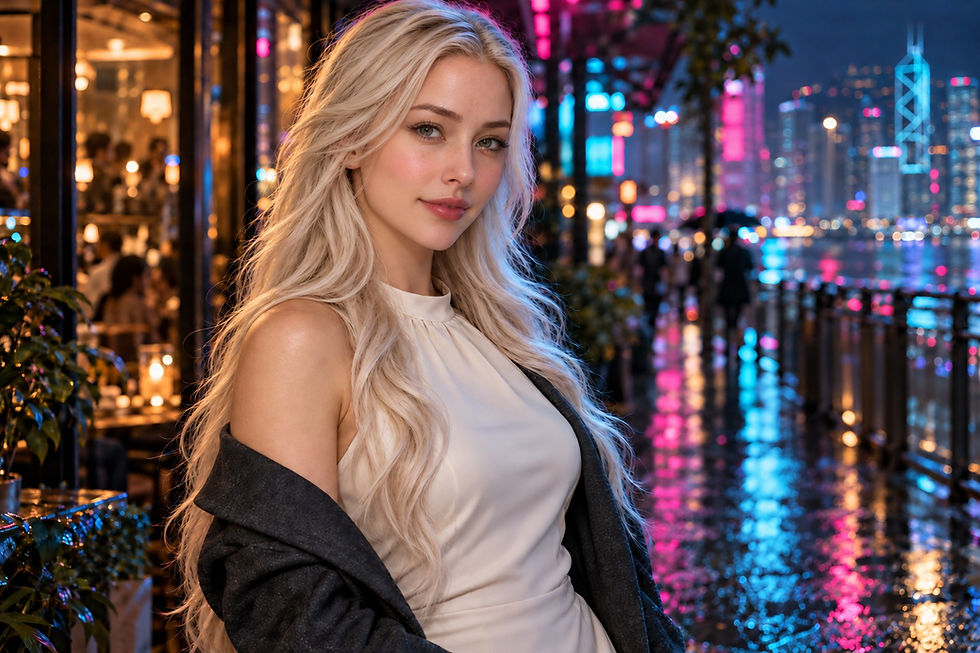
Make two exposure decisions
Choose the background colours and bright areas you want to keep, then place the face where useful light reaches it. Brightening the whole frame and adding light to the face are different decisions. Let the next test answer one of those questions.
Review facial brightness, eye detail and skin colour separately. A good background does not rescue a face that is too dark or blurred by movement. Keep track of the adjustment that improves each result.
1. Decide which background lights to preserve
You do not need to preserve every tiny bulb or specular reflection. Choose the neon colors and shapes that establish the setting, then make a test exposure and see whether those areas have become broad white patches.

A histogram describes the distribution of brightness: darker values sit toward the left and brighter values toward the right. Use it with the recorded photograph rather than treating a balanced-looking graph as a target. A luminance histogram alone does not guarantee that every saturated color channel retains detail.

2. Improve the light on the face before raising everything
First ask whether the background looks right while only the face is dark. If so, raising the entire exposure may wash out the neon without solving the relationship between the two. Move the person nearer a useful window or doorway light, keeping the route safe and clear for pedestrians.

Turn the face gently toward that light and make another test shot. Look at the eyes, forehead and cheeks together: a bright edge on the hair does not necessarily mean the face is well lit. A small position change can be more useful than a large exposure increase.

If position alone is not enough, add a little soft light to the face. Stop when the eyes and skin become readable; too much fill can make the person look detached from the night scene. Continuous light and flash interact differently with ambient light, so do not assume that the same settings will behave identically when you change lighting equipment.

3. Balance skin color and the neon mood
A neon location often mixes light sources with different colors. Making every background light neutral is usually not the aim. Instead, decide whether the color falling on the face supports your portrait, and change the position or face direction if a strong green or magenta cast obscures the skin.

A small colored edge can add atmosphere; an entire face reduced to a flat color is a different result. Judge the eye area, cheeks and forehead in the test image rather than memorizing one color-temperature number. RAW gives you editing flexibility, but it is still worth improving severe mixed-light problems on location.
4. Confirm shutter speed and eye focus in a test shot
For a mostly still person, around 1/125 second can be a trial starting point. This is an editorial practice suggestion, not a guarantee against blur: subject movement, framing, focal length and camera handling may call for a faster shutter. Check the value actually recorded, especially when an automatic exposure setting is involved.

For one camera-specific example, the A7 IV offers ISO AUTO Min. SS in aperture-priority use with Auto ISO. Its official guide notes that shutter speed can fall below the chosen minimum when the ISO upper limit is reached. Other cameras have different menus and constraints, so confirm the equivalent behavior in your own manual.
Focus on the eye and magnify one recorded frame. If the background appears sharper than the eye, check focus placement; if the whole face is smeared, also check motion and shutter speed. Treat these as separate questions instead of assuming every soft portrait is an autofocus failure.
5. Edit the face and background separately
Start with the overall relationship between background highlights and face brightness. If the face still needs a small correction, select it with a mask rather than brightening the entire photograph. Lightroom's local controls let you adjust brightness and tonal ranges within the selected area, while local temperature and tint can help with mixed color.

RAW is not a promise that clipped color or very deep shadows can always be recovered cleanly. If lifting the face reveals strong noise, blotchy color or an obvious mask edge, reduce the correction. At the next shoot, improve the light reaching the face instead of relying on a larger edit.
The five-step field checklist

Choose the background light to keep → adjust the face position → add gentle fill only if needed → check the eye and motion → refine color and the face/background balance. Repeat with test shots, changing one thing at a time. The portrait should still be about the person.
Sources and image notes
Revised 19 October 2026: this English article was rewritten to cover the same neon-night portrait topic as the Korean guide. The previous midday-lighting article has been retained in the revision backup.


Comments